A bunch of feedback on 4.0

Hey, I just tried the beta again for the first time since a long ago. Overall, it seems like a big improvement from before. I love how the settings are much simpler. This is my feedback from initial impressions. Definitely no need to respond to all or even most of it. I haven’t read other feedback reports, so probably some of this has already been reported, and a lot of it is nitpicky UI stuff that is just my own opinion anyway.

SETTINGS
  1. “Fonts and colors” in settings seems like its just fonts for now
  2. I love the font previews
  3. Since all font sizes are relative, it seems like it would make sense to have a setting that adjusts the default size for all, like at the top of the fonts section. OR maybe a master control that changes sizes throughout (e.g. default > large), with the appropriate warning that it will override individual choices.
  4. For the font size options, it seems like the “custom” label would make more sense as “more.” Elsewhere, custom indicates a range of different settings whereas here its just means more size options.
  5. In the custom sizes menu, it would be nice to indicate what default, large, etc. refer to, e.g. 100% (default), 150% (large), etc.
  6. Changing Chinese text size in “Definition Body” also changes it in “Popup Reader.” Meanwhile “Popup Reader” doesn’t have its own feature to adjust Chinese text size. It is also missing in “List.”
  7. It seems strange to me that there are Reader Bubble settings in the Settings that are separate from the document profile settings. Those settings seem like things that would also make sense as part of profiles, or at least having them in profiles would simplify the settings. What I would expect instead is a document profiles manager in settings where you can see and modify all your document profiles.
  8. It would be nice to have line(s) of explanation in settings for what search views, search screens, and search shortcuts are.
  9. Seems like there should be an “Edit” button in Search views and elsewhere like there is in Flashcard profiles to be able to delete profiles without going into the items. But maybe in practice those things are deleted much less often.
DICTIONARY
  1. Search screen: Is the option to change dictionary tabs to the one button switcher gone? I liked that switcher.
  2. I love the integration of notes directly in the dictionary.
  3. The background colored squircles lag when scrolling compared to the other elements, even with slow scrolling (night mode).
  4. In dictionary screen, I’d love a way to turn off those background squircles altogether and return to a 3.0 type interface with the various definitions separated by lines and just a small dictionary name abbreviation off to the side. For me that interface emphasizes Pleco’s value in putting a bunch of definitions together and just letting you scroll through without caring too much about which one is from which dictionary.
  5. I’d love an option to have a normal scroll bar instead of the dictionary scrollbar on the side, would allow the entries to be wider.
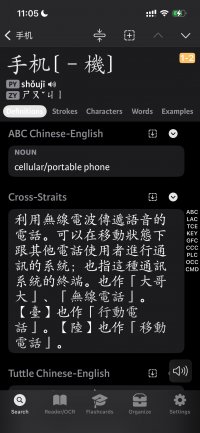
  6. The tab labels in the dictionary screen are almost the same color as the highlight around the selected tab (white in night mode).
  7. The Unihan extended definition doesn’t seem to follow the font settings.
  8. Very small thing: It seems like the Commands label fonts should be the same size or smaller than the default font size, not bigger.
READER FILE BROWSER and FILE MANAGER
  1. I encountered a crash when adding a PDF file without searchable text to reader. After relaunching Pleco, the file is already in reader like it should be, with OCR done automatically. It happens every time I add that file. It’s a small PDF (under 1mb). I can share the file if need be. Speaking of, I wonder how Pleco decides to auto-OCR a PDF or not.
  2. At the bottom of my recents are placeholder thumbnails for a bunch of images all labeled “Library Photo,” which seem like all the photos I’ve ever OCRed in Pleco. But they’re not stuff I saved to file manager, so it doesn’t seem like they should be there. Most of them don’t open (presumably the original was deleted), but they give a warning about Pleco needing photo library access instead of realizing the original doesn’t exist.
  3. Some files were not migrated for some reason (from Pleco Legacy to 4.0). I couldn’t figure out any similarity between them. No patten in their age or size or name or type or anything.
  4. I like the reader redesign except: it is odd to me that the reader file browser is distinct from the file manager, and deleting a file from reader doesn’t delete it from file manager. I think I understand the technical reason why (once a file is opened in Reader it gets metadata), but for me it is going to be a recipe for a lot of clutter (I delete a file from reader but still need to go to file manager to delete it again). Of the other document-based apps I use, none use this dual-level document browser, even if they add their own metadata to the file. I.E. what I would expect is reader shows you pinned, then recents, then all your files from file manager, and there is no notion of having it in file manager but not in reader. BUT if that whole set-up doesn’t change, it would still be great to have an option to always delete from file manager if you delete from reader, or at least a prompt asking if you also want to delete from file manager. For me there would basically never be a time I want to delete from reader and not from file manager. The only thing I can think of is wanting to reset all the metadata (e.g. clear the highlights), but that should maybe have its own option.Likewise, on first set-up of Pleco, it would be great to auto-import the folders from file manager into reader instead of having to recreate them there.
  5. It seems odd to me that there are buttons for clipboard, live OCR, and web, but no buttons for the other options from the Open... menu (e.g. the various still OCR functions, Open File, and the Pleco Bookstore.
  6. When I delete those buttons, it shows the same warning it does for deleting documents. Seems not necessary.
  7. Seems like “Open...” should maybe be renamed to “More...” or “Add...”
READER DOCUMENT VIEWER
  1. In general, the reader settings with document profiles are way clearer (and more functional) than they used to be. Nice work. Maybe to make them even clearer, add a note at the top of the document settings reminding that the settings are only for that single document.
  2. It seems like maybe EPUBs should have own default document profile instead of going under “text.” Pleco books like Chinese History could also use it.
  3. Will there be an option to customize the top menubar in the reader? I like the set for the clipboard better in 3.0. It would also be nice to rearrange to get one-tap access to highlights, for example.
  4. In Reader document settings, there is just an option to magnify Chinese text, which is inconsistent with the granular control in other font settings.
  5. It would be nice to have a link to Popup Reader settings from the reader document settings page.
  6. PDFs in reader: For long PDFs, the page icons at the bottom are misleading because there are way more pages than there are icons. It seems like a slider would make more sense.
  7. The labels of the PDF reading options are misleading to me—first, the fact that they are hidden behind the share menu (I get that iOS puts lots of random stuff behind share menus, but I don’t like it there either). Second, they don’t change the PDF view but extract text. The glasses icon in 3.0 was clearer in that regard.
  8. Word documents work in reader, but font size settings don’t do anything except change new line sizes (at least in the document I tried with). So it seems like the font size setting should be grayed out or something.
  9. An option to extract Word doc text like with PDFs would also be nice.
  10. The animations for showing and hiding the bottom bar feel slow when everything else in the interface is snappy. I’d love a way to turn them off.
  11. The translation function is very cool, but the font of the translation is oddly small and can’t be adjusted. An option to copy the translation would also be nice.
  12. The back button that shows up in reader is great. Nitpick: Instead of a triangle, the standard back icon of the arrow that circles around would make more sense to me.
FLASHCARDS
  1. I’m not sure what “container only” and “compound name” do in folder settings or “is stub” or “is rare” do in card settings. Inline explanations would be great. I remember how often I had to go to the manual to figure out Pleco 3. It would be great if that could be avoided with more inline explanations here.
GENERAL UI
  1. When selecting text in iOS, I’ve come to expect a small vibration bump and don’t get it here.
Thanks for all the hard work!
 
Thanks for all this great feedback! Sorry for the slow reply.

Settings:
1: "colors" is a reference to the separate 'tone coloring' section, is that not showing up for you?
3: there's an option in Control Center to adjust font sizes for a specific app, does that work or do you need this separate from the ability to adjust UI font sizes?
4-5: custom sizes: small/default/large/x-large are adaptive in some cases and don't neatly correspond to specific percentages; also, we kind of view it as expressing a general preference and we might tweak some of those sizes in the future. Custom is basically opting out of that system and saying that you always want X to be a specific size. So the use of the name 'custom' and the lack of an advertised mapping between those named sizes and percentages is due to that.
6: actually that's a bug, it's not supposed to be magnifying Chinese text in the reader at all, or in the list - I see it doing that in the reader but not in the list, is it magnifying text in the list for you? Can you give me an example of an entry where it does that?
7: the popup reader dictionary order is overridable in document profile settings, with the others we generally assume people are going to want it to behave the same way everywhere and not want to have to fiddle around with reapplying their settings to a particular document. If there's a lot of demand for it it wouldn't be hard to add an 'override reader settings' option to a document profile, but we would probably do it that way rather than forcing people to customize it.
We could consider adding a document profile manager to settings if that feature gets used a lot, but I kind of feel like putting it in document settings is the natural place for it since that's where you're using and selecting them anyway.
8: those should be coming, along with inline help, we've just been trying to nail down the design first.
9: yes, makes sense, through might be one of those mopping-up 4.1 things.

Dictionary:
1: yes, for the moment. It was an enormous pain to support - the search bar doubly so - and was likely going to cause even more issues when Apple takes away the ability to opt out of Liquid Glass, so we'll probably only consider bringing it back after everything has settled with iOS 27 if there's still demand for it at that point.
3: yeah, that one's actually extremely dicey because basically if we preload them it takes too long to scroll between tabs but if we don't preload them they sometimes lag on load, we're still trying to finesse preloading them in a background thread.
4: this is also a casualty of Trying Desperately To Deal With Liquid Glass, we had a 'compact mode' at one point but it was completely borked by the not-quite-Liquid-Glass compatibility layer in iOS 26. So something which again we might add back once we see how things are with iOS 27.
5: doesn't that come up now if you turn on 'show dictionary slider'?
6: sorry, I don't quite follow: the tab labels meaning Definitions / Characters / etc? They're the same color as the rounded rectangle around Definitions or whatever?
7: reproduced, thanks.
8: commands are supposed to be the same size as settings screen commands, are they showing up larger than that?

Reader:
1: I think we found that crash log so should be fixed in the next beta.
2: yeah, probably a botched migration from the legacy app, we'll investigate.
3: did the files not migrate at all or did they simply not show up in the bookshelf? For the bookshelf, we only bring over files that had actually been opened once (and had a .plecobookmarks file with their last location and any bookmarks created) - would that match what you saw or were there missing files that you know you had actually opened?
4: the problem there is that the file manager can also have lots of other files, flashcard backups and such. And at the same time, there can be pleco e-books that don't correspond to files in the file manager, not to mention all those library photos. Our expectation with file manager is that most people will ignore it, but that being the case it probably does make sense to integrate deletion of the original file with deletion from the bookshelf (as we already do with pleco e-books).
5: technically we consider those to be singleton 'documents' rather than commands; any of the other things you might open would produce their own listing in the bookshelf for each new thing you open, but those don't. (and couldn't, really - making a separate document for every clipboard record or web page would be chaos)
6: deleting them does delete their associated settings - and with web also all of their web bookmarks - but the message is confusing. The intent in making them deletable is to let people who don't ever use those features declutter their bookshelves. Maybe it would be better to make them hide-able with that command and then we un-hide them if people open them from the menu?
7: I think 'open' probably makes the most sense there because very often you're acquiring a file from another storage service or your photo library or whatever - I recognize that functionally it means you're adding metadata for an existing document but "I want this file I have somewhere to appear in the Pleco document reader" is the most essential thing that button does and "Open" is a well-understood command for that.

Document viewing:
1: yeah, we're on like our third major redesign of 'document profiles' and it's still a bit confusing. But the most common use case is somebody opening up documents and expecting them to behave like they do in iBooks, where once you've opened a book it keeps opening the same way until you change it again, so while I recognize the necessity of having some way to change document settings in bulk I kind of feel like it's a specialized thing that it's OK to keep somewhat buried.
2: not sure about that one, are people really likely to want different font sizes just because text is rich or not rich?
3: not at the moment but can consider adding based on demand.
4: yeah, probably makes sense.
5: I'm a little reluctant about that because then it would be unclear whether these settings are just for the document or systemwide.
6: I believe this is the normal behavior for the iOS system PDF viewer?
7: sorry, isn't this the same behavior as the glasses icon? I know the share menu isn't great but since it is an iOS convention we feel like it's the logical place to do it.
8: that should be fixable, will check.
9: the Word document view now actually is the text-extracted view, at least it should be - are you seeing differences between that and the sort of extracted text you get from other things?
10: yeah, makes sense.
11: the translation UI at the moment is meant to be meh because we're using it in a not-100%-kosher way (I mean we're not breaking any rules but we're not doing it in the way they intended) and are worried we might have to switch to using Apple's translation popup instead, and don't want people to complain about it getting worse if we do.
12: yeah, makes sense.

Flashcards: yes, more inline explanations are coming. We're on the fence about exposing 'is stub' or 'is rare' at all actually though we do use them internally quite a bit.

General UI: yeah, we need to add that haptic feedback.
 
Thanks for the comprehensive reply! Just replying to some of these.

Settings:
1: Oh of course, yeah I have tone colors.
3: Oh I never even knew about that control center setting. Weird, it seems like a long-press in the control center is the only way to access it, it’s not available even in the Settings app. I will mess around with it. I guess cause its system level you can’t put an “alias” type of setting for it within Pleco.
4-5: Ohhh I hadn’t realized the named sizes were relative and custom was non-relative because custom is still percentages not point values.
6: No it’s not doing it in the list. I just meant being able to enlarge Chinese text in the list (definition) would also be nice.
7: Makes sense.

Dictionary:
1: Not a big deal to just have tabs anyway.
3: For some reason the background shapes are not lagging today. Not sure if something changed on my end or what.
4: Sounds good.
5: Oh, of course, missed that, nice. Also just saw the command bar that appears if you search for a phrase in dictionary. Nice touch to be able to go right into reader, something I’ve often wanted to do in 3.0.
6: See the screenshot attached.
8: Yes, they are aligned in that regard. I just meant it’s a little weird that they’re not treated as dictionary text for font-size purposes, but that’s just my preference.

Reader:
3: The files did not migrate at all (to file manager or bookshelf). But I looked more closely and it was a date cut-off: Nothing added after ~2024 migrated, including folder layouts—seems to be drawing from an older database (maybe when I moved to Legacy 3.0?). Flashcard data is current though. I uninstalled and reinstalled the Beta twice and each time the same.
3.1 When doing this, it occurred to me it would be nice to be able to separate by files type or at least separate folders and files in the file manager
3.2 New thing I noticed: search in file manager is a bit laggy and file extensions can’t be searched for even when part of file name.
4: Deletion of the original file with deletion in bookshelf would be the main thing for me, to avoid clutter.
5: I get the logic. I think for me it would add convenience to have the option of one-button access to those reader functions even if they are just creating new documents.
6: Yeah, hide not delete would make sense to me. If someone wants to reset settings it seems like that should be a button within reader settings.
7: I think what was weird to me about “Open...” is that the options in that menu are mostly further commands rather than things that would be opened(i.e. Open... File vs. Open... Open File), but anyway it’s a nitpicky thing.

Document viewing:
1: I think it works pretty well now. Even something just like “Settings - This Document” would make it even clearer—or even changing the gear icon to a “Aa” fonts icon. But it’s only an issue for new users first learning to use the reader, not for usability thereafter.
2: The main thing I was thinking of for an rtf/epub document profile was not font size differences but a different default bottom layout for books because they are much longer. But it doesn’t really matter because I never have that many books going at once, so I can just manually set a document profile for them. For a similar reason, it might be nice to be able to disable "tap side to move" on a per-document basis, similar to how you can override reader dictionaries per document.
6: For me PDFs always open in continuous scroll mode elsewhere in iOS so I don’t see it, but if you’re just using the system thing then don’t worry about it. One thing though: if you turn off those thumbnails, there is a quasi-scroll bar at the bottom that is kind of broken.
6.1 Minor issue: From the system share menu there’s no option to save a PDF to Files—many actions are missing compared to e.g. the share menu for a PDF in Files. The “View Less” also doesn’t do anything, and if you switch apps while the share menu is open and switch back, it’s disappeared and been replaced by one of the actions below it.
7: Yeah, just a UI nitpick, not about functionality. It’s fine once I realized what the buttons do.
9: The font sizes not changing is why I didn’t realize it was extracted. It would be nice to be able to convert to plain text, maybe an option in the share menu to open as a new plain text file?
11: I 100% support not using their translation functionality in a not-100%-kosher way lol. I made a shortcut for myself to do a similar thing.
 

Attachments

  • 84BBBE72-9F4C-4598-B404-4028E425FC8B_1_102_o.jpeg
    84BBBE72-9F4C-4598-B404-4028E425FC8B_1_102_o.jpeg
    382.4 KB · Views: 3
Back
Top