
Correct answer in multiple choice test always the second one.

How do I make the answer appear randomly? Currently after a few questions, the answer defaults to the second option in the list. I have changed the Test, Display options around but this makes no difference.
Thank you for any advice.
 
That's odd, I don't even see anything in the code that would explain it - is this a situation where a given card might only have one or two alternatives that match its number / pattern of characters?
 
Thank you for your reply Mike. I'm not sure if this will help in discovering the issue, but the test parameters are: Card categories = 1 category, Prompt for = Characters, Show = Pron + Defn, Test settings: Subject selection= Simple, Number of choices = 5, Choices from = Custom categories, Card categories = 25.
I changed 'Choices from' to All cards and still get the same result (after about three cards, the answer is always the second one).
 
No luck so far, unfortunately. Could you email support at pleco dot com with a backup of your flashcard database? We can try to reproduce it with that.
 
Thank you for your response. I think I may have stumbled upon the solution. I was going to send you the backup from my phone (rather than tablet) and thought I'd just check whether the issue was happening there also. It wasn't, so I went through the test settings (unfortunately from the bottom up :)) and found that changing the Profile from Spaced Repetition to Simple, stopped the answer mostly being no.2.
I have put it back to Spaced Repetition on the tablet, made a backup and sent it to support.
 
Thanks - weirdly enough we can't seem to reproduce this even on your backup. Did the problem actually come back when you switched back to Spaced Repetition? (perhaps it was some sort of temporary glitch that was resolved by the profile change)
 
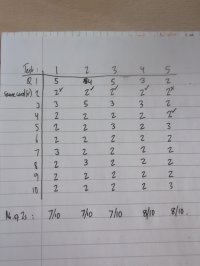
I put it back to Spaced Repetition, and did 5 tests. The results of the correct answer location are attached. The test was on Yunchen Lesson 1, Max # of cards 10.
(The tick marks show where the same card 發 appeared.)
 

Attachments

  • 17854759838758067723105417547845.jpg
    17854759838758067723105417547845.jpg
    582 KB · Views: 7
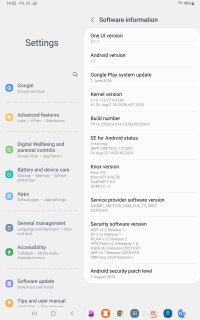
I double checked the code and I can't find any explanation for this other than something bugged in your device's random number generator - what model of Android phone is this and what version of Android is it running?
 
I have reset the Spaced Repetition profile on the tablet and now it is behaving normally. I must've twisted that profile up over the years Thank you very much for your assistance.
 
Back
Top