Dictionary search lost it's color

After searching for an english or a Chinese word my dictionary used to pop with words colored like the first picture, but now it shows up like the second picture. It makes it a lot harder to actually go through the list of words that show up. I've tried going through the settings but I can't find anything. This happened after I purchased the Pleco basic bundle I think it was called? Any help reverting the color change would be appreciated, thank you!
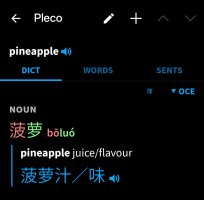
 

Attachments

  • IMG_20260406_203405.jpg
    IMG_20260406_203405.jpg
    104.7 KB · Views: 13
  • IMG_20260406_203423.jpg
    IMG_20260406_203423.jpg
    37.8 KB · Views: 14

mikelove

皇帝
Staff member
Is the tone coloring option turned on in Settings / Colors? Also, by any chance is there a setting turned on on your phone to reduce (or increase) contrast? Some phones offer that and it effectively forces Pleco to black & white only.
 
Is the tone coloring option turned on in Settings / Colors? Also, by any chance is there a setting turned on on your phone to reduce (or increase) contrast? Some phones offer that and it effectively forces Pleco to black & white only.
I do have the tone coloring option on. I was able to get a workaround by changing the Oxford E-C dictionary to search only as fallback. This still gives me that dictionary when relevant now, but doesn't only show that when searching in english.
 
Top