
You are using an out of date browser. It may not display this or other websites correctly.
You should upgrade or use an alternative browser.
You should upgrade or use an alternative browser.
Flashcard wrong time period on answer selection
- Thread starter fiftyfour
- Start date
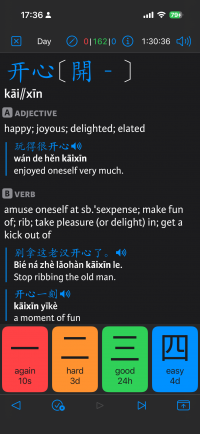
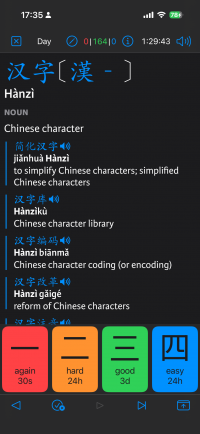
I mean the buttons at the bottom, again, hard, good, easy.

In this example, I don't think hard should be 3 days, and good 24 hours.

Or in this case, good is 3 days, but easy is only 24 hours. I believe the scheduling time should always be increasing from the left to the right. It's correct for most cards, just some have outliers.
In this example, I don't think hard should be 3 days, and good 24 hours.
Or in this case, good is 3 days, but easy is only 24 hours. I believe the scheduling time should always be increasing from the left to the right. It's correct for most cards, just some have outliers.
YoutiaoDino
秀才
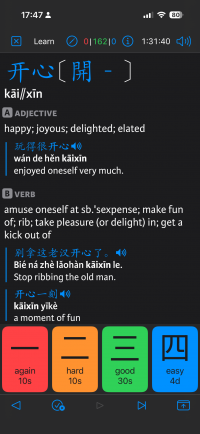
I have also experienced this in the beta.
I would share but the custom test settings take a while to screenshot and I am at work.
I wonder if there is a way to export my test settings as a file or json for you to inspect?
I would share but the custom test settings take a while to screenshot and I am at work.
I wonder if there is a way to export my test settings as a file or json for you to inspect?

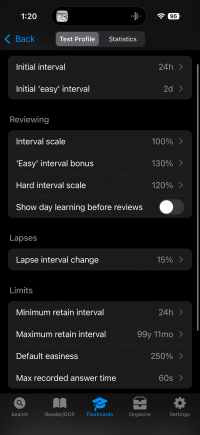
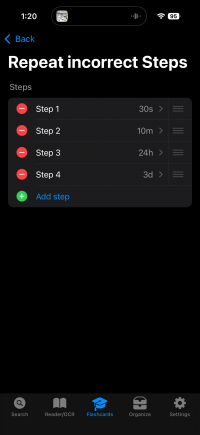
We've found the problem, it's actually just that the default learning interval steps are longer than the default review stage intervals - you can fix them by increasing the default intervals in 'configure SM2 algorithm.' (in the next update we're adding an on-by-default option to automatically set those intervals based on your learning steps, so it will behave sensibly even without visiting that screen)
YoutiaoDino
秀才
Thank you for the update. This next suggestion may be leaning towards “nice to have” rather than bug report.
Would it be possible to warn the user when their steps are inconsistent between learning/reviewing/incorrect? Without some kind of feedback it is hard for me to set them properly.
Would it be possible to warn the user when their steps are inconsistent between learning/reviewing/incorrect? Without some kind of feedback it is hard for me to set them properly.
Attachments
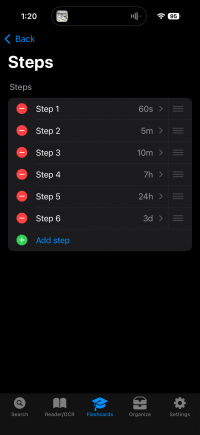
We could theoretically add an alert, but honestly I think by having a sensible default behavior - which in our case is now basically going to be "1 and 4 days if the maximum learning step is less than 1 day, otherwise change the interval as if they were already in review mode and they picked good / easy" - is probably enough; I don't think most people want to have to think about that setting.