
You are using an out of date browser. It may not display this or other websites correctly.
You should upgrade or use an alternative browser.
You should upgrade or use an alternative browser.
Screen OCR + Screen Reader
- Thread starter mikelove
- Start date

Actually OCR function gives very excellent results with bad-scanned text - sometimes I cannot even suppose what a char looks like, but the app gives correct result.
But sometimes it cannot recognize clear, easy readable text and even gives no correct variant for substitution (on long-tap list).
But sometimes it cannot recognize clear, easy readable text and even gives no correct variant for substitution (on long-tap list).
Last edited:
The screen reader stopped working for me with Wechat, the messages are not being recognized as text (see screenshot) . I'm not really sure when this started. I think it was before the most recent update of Wechat and Pleco, but I'm not sure.
Attachments
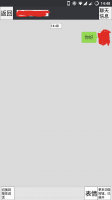

Ugh, looks like WeChat is now intentionally blocking chat messages from being readable by screen readers. Which is a pretty spectacular dick move - cut off access to your app for blind people just because you can't cope with the possibility of a few 老外 using a non-Tencent solution to translate text on the screen.
The previous version 6.5.10 works just fine with Screen Reader, so I'd suggest you download that (e.g. from here) and install the APK over what you have now - that should get it working again. Screen OCR still works fine in the new version (at least for now), and we have a solution in the works that would let us combine both systems to recognize where text bubbles appear on the screen (which WeChat still does report) to improve OCR accuracy in WeChat chat windows, but since they're no longer exposing text from chat bubbles to the Android accessibility framework there isn't really a good way we can fix this for Screen Reader.
(we're also looking at hacking into Web WeChat, which would potentially let us put up WeChat messages in a nice clean Pleco interface, but we haven't yet come up with a way to do it that doesn't require you to log into WeChat on a different device in order to scan the QR code to activate it on your main one)
The previous version 6.5.10 works just fine with Screen Reader, so I'd suggest you download that (e.g. from here) and install the APK over what you have now - that should get it working again. Screen OCR still works fine in the new version (at least for now), and we have a solution in the works that would let us combine both systems to recognize where text bubbles appear on the screen (which WeChat still does report) to improve OCR accuracy in WeChat chat windows, but since they're no longer exposing text from chat bubbles to the Android accessibility framework there isn't really a good way we can fix this for Screen Reader.
(we're also looking at hacking into Web WeChat, which would potentially let us put up WeChat messages in a nice clean Pleco interface, but we haven't yet come up with a way to do it that doesn't require you to log into WeChat on a different device in order to scan the QR code to activate it on your main one)
@mikelove
Regarding the screenreader, could you please check and verify if there is also an issue with Firefox 55.0.2?
I have tried various websites like: https://zh.m.wikipedia.org/zh-hans/海南省
However, either the screenreader can only read the link in the address bar or it keeps saying: "No readable text was found on this screen - please wait a few seconds and try again. (it might also help to scroll a bit, if it's a scrollable view)"
I use Pleco 3.2.47 on Android 4.4.4.
Regarding the screenreader, could you please check and verify if there is also an issue with Firefox 55.0.2?
I have tried various websites like: https://zh.m.wikipedia.org/zh-hans/海南省
However, either the screenreader can only read the link in the address bar or it keeps saying: "No readable text was found on this screen - please wait a few seconds and try again. (it might also help to scroll a bit, if it's a scrollable view)"
I use Pleco 3.2.47 on Android 4.4.4.
Last edited:
wechat blocking instant chat messages to work with screen reader , even i have updated the pleco to latest version but still no luck with wechat 6.5.13 version which is latest and it was forced to install and update report does not even mention anything about it.
dear pleco team
can you fix this problem ? it makes me completely blind.It was working fine till the new wechat update appears .
all guys dont update wechat if you love screen reader of pleco.
thanks and greets to pleco team
regards
dear pleco team
can you fix this problem ? it makes me completely blind.It was working fine till the new wechat update appears .
all guys dont update wechat if you love screen reader of pleco.
thanks and greets to pleco team
regards
There should be two buttons in the screen reader floating palette, one for reader and one for OCR. (OCR has a Google Cast icon) If you only see the one, long-press it and there should be a menu command to un-hide the second one. If there isn't, make sure you've downloaded our OCR add-on in "Add-ons," and that you're running Android 6 or later.