Nyanyapupo
Member
Not sure if this bug has anything to do with Pleco or rather it is the fault of the operating system but I will try to be detailed.
My device is a Boox Palma 1 ereader running Android 11 2026-06-04_00-21_4.2-rel_0603_095d17272b.
Pleco generally runs fine but since I updated the device an issue has appeared. When I use Neoreader with the external dictionary set to Pleco and select a word, unless Pleco is completely closed at that point, when it pops to the foreground I do not see my toolbar buttons on the bottom, instead of that just a white bar. The selected word however is detected and input in the search box. I then switched to Koreader and set up Pleco as an external dictionary. Now when I select a word it sends me to Pleco and the toolbar is there. A milder version of the bug appears if after being send to Pleco I press the home page button or the recent apps button -- when I return to Koreader and select a word it sends me to Pleco and the toolbar is gone but it has also not even input the new word in the search box. The toolbar returns if I draw down the notification or the control centre. If I kill Pleco the bug does not appear at all. I kind of got around it by installing Macrodroid and making it kill Pleco everytime it leaves the foreground but I feel like this solution is very stupid.
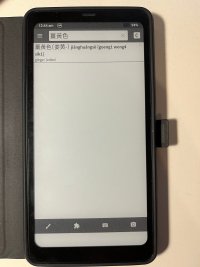
I have inserted a picture of the white bar at the bottom of the screen.
Could you maybe help me understand or detect if the problem lies within the two reading programs that I have tested, Android or Pleco?
My device is a Boox Palma 1 ereader running Android 11 2026-06-04_00-21_4.2-rel_0603_095d17272b.
Pleco generally runs fine but since I updated the device an issue has appeared. When I use Neoreader with the external dictionary set to Pleco and select a word, unless Pleco is completely closed at that point, when it pops to the foreground I do not see my toolbar buttons on the bottom, instead of that just a white bar. The selected word however is detected and input in the search box. I then switched to Koreader and set up Pleco as an external dictionary. Now when I select a word it sends me to Pleco and the toolbar is there. A milder version of the bug appears if after being send to Pleco I press the home page button or the recent apps button -- when I return to Koreader and select a word it sends me to Pleco and the toolbar is gone but it has also not even input the new word in the search box. The toolbar returns if I draw down the notification or the control centre. If I kill Pleco the bug does not appear at all. I kind of got around it by installing Macrodroid and making it kill Pleco everytime it leaves the foreground but I feel like this solution is very stupid.
I have inserted a picture of the white bar at the bottom of the screen.
Could you maybe help me understand or detect if the problem lies within the two reading programs that I have tested, Android or Pleco?