3.1.4 Bug Report / Feedback Thread

Hi Mike, I just bought the latest iPad Air running iOS 8 and am using Pleco on it. I went to the Flashcards menu and clicked Import/Export->Install Premade Cards->Yes and a dialog box or information window flashed up momentarily and then disappeared displaying the iPad home screen. The Pleco app was still active in the list of currently active apps. On checking, no Flashcards or lists were downloaded.

I also tried this on my new iPhone 6 with the same result.
 
Last edited:
Hmm, not seeing any sign of this on either of those devices here with the current version of Pleco - are you perhaps running an outdated version? Check the App Store "Updates" tab on that - by default, when you restore from a backup Apple gives you back whichever version of the app you were using when you made that backup, even if there's a newer one available.
 
Hmm, not seeing any sign of this on either of those devices here with the current version of Pleco - are you perhaps running an outdated version? Check the App Store "Updates" tab on that - by default, when you restore from a backup Apple gives you back whichever version of the app you were using when you made that backup, even if there's a newer one available.
I checked the "Updates" tab on both the iPad and iPhone and I have the latest version in both cases.
 
Hmm... well we're definitely not seeing it here, nor have we had any other reports of it, so it has to be something specific to your configuration...

Have you enabled iCloud flashcard sync? Have you changed any of the options in Settings / Flashcards from their defaults? Are you using Pleco in regular color mode or Night Mode? Are you able to do flashcard tests normally aside from this error? How many flashcards are in your deck now (you can check that in Statistics).
 
I
Have you enabled iCloud flashcard sync? Have you changed any of the options in Settings / Flashcards from their defaults? Are you using Pleco in regular color mode or Night Mode? Are you able to do flashcard tests normally aside from this error? How many flashcards are in your deck now (you can check that in Statistics).
I have now enabled iClouds Flashcards sync. As far as I know I haven't changed any settings from their defaults other than enabling the sync. I'm using regular color mode. I haven't yet tried other flashcard tests as I have no flashcards in my deck. The problem is still there. I'll try installing some other flashcards and let you know the result.
 
Hmm... only other thing I can think of is that your flashcard database was corrupted somehow, though it's very odd that that would affect both devices - was one of them restored from a backup of the other one?
 
Yes. I have also found that flashcards->organise cards->edit also causes Pleco to be replaced by the home screen. So does this mean I will have to remove all of Pleco with all my add-ons and reinstall Pleco or can I just reinstall Pleco?
 
Last edited:
Well Mike, you were right about the flashcard database being corrupted. I erased the database in flashcard settings, and all was ok. I have now downloaded again the various flashcards lists I used on both the iPad & iPhone. Thanks for your help.
 
Small thing I've noticed which I can't remember if it was previously discussed in the forums.

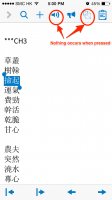
Within the document reader f I have selected some text and have the popup window visible but then change the orientation of my phone it retains the character selection (they stay highlighted) but the popup window disappears. However, the menu bar remains as though the popup window is still there. Pressing most of the menu buttons while it is in this state gives no response (like audio icon or the enlarge character icon) . Screenshot attached.
 

Attachments

  • IMG_6092.jpg
    IMG_6092.jpg
    189.6 KB · Views: 1,042
Another thing I've noticed in this version is it seems Pleco occasionally takes a longer time than usual to become responsive when switching over to the Pleco app via the running app windows (double-tap home button).

The Pleco screen will appear immediately (based on whatever state it was in from the last time it was in use) but remains frozen/stuck and is not responsive to taps for about 5 seconds. I am unclear if it is loading things back into memory or blocking on some type of iCloud refresh before it allows me to do anything, but this is the first version in which I've noticed that happening.

iPhone 5, iOS 8.0.2, iCloud Drive On

Cheers,
Brian
 
The screen rotate bug is already fixed for 3.2. With the freezing bug, we've managed to mitigate it a bit in 3.2 but it's really an issue with iCloud on iOS 8, one that we're waiting for Apple to fully fix - you can get rid of the freezes by turning off the option to sync history to the cloud in Settings / Search Interface.
 
Ah, that one might be fixable on the database side (filtering it out in the full-text index) - thanks.
 
• when transparent handwriting is 'off' other selections (keyboard/radical) cannot be clicked/selected.

• when transparent handwriting is 'off' if you select an entry and then click 'back' transparent handwriting will be automatically turned 'on' (this is, assumeably, undesired behavior).

• images can't be "zoomed in" on - this is a huge bummer - I love the zoom in feature but characters that haven't been added to the Unicode system and oracal/etc pictures (esp. Ricci) when 'zoomed in' on just appear two big black and white 'A's. Zoom-in-ability would, of course, be much welcome.
 
Quite right on #1 - thanks! Good point on #3 as well.

Turning transparent handwriting back on on a return from the definition screen actually is the intended behavior - we assume that in that case you'd like to search for something else (since if you just want to flip through search results it's easier to just use the buttons at the top right corner of the definition).

Also, it sounds like you can create this particular workflow in the same number of taps by tapping Done instead - tap that to exit handwriting, scroll through / tap on search results as much as you like, then when you're ready to search again, a single tap on the search bar (larger and easier-to-tap than ON/OFF) gets you right back to active handwriting.
 
Back
Top