
You are using an out of date browser. It may not display this or other websites correctly.
You should upgrade or use an alternative browser.
You should upgrade or use an alternative browser.
Pleco Can't Access Image Gallery on S23
- Thread starter bigfish
- Start date

Hmm… I’m afraid in that case it’s probably some sort of bug specific to the S23; we don’t currently have one of those in our test pool since they’re so new, but once we get one we can try to reproduce and fix it. (Or perhaps this problem will show up in a firmware update to some other phone we already do have)
I assume there isn’t any general option in the system settings to allow apps freer access to the photo library? Or to use Google’s photo library instead of Samsung’s?
I assume there isn’t any general option in the system settings to allow apps freer access to the photo library? Or to use Google’s photo library instead of Samsung’s?
Lyra Quelene
Member
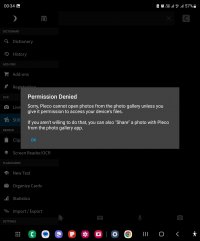
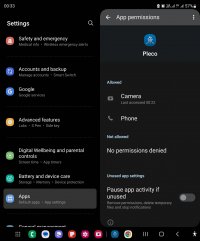
It occurs to me that this might relate to a recent file permission change we had to make in order to comply with Google Play review guidelines. So maybe try reverting to an older version of Pleco? Here's a download link for an APK:
That dates from before we made that change and still asks for the permission we're no longer allowed to ask for.
That dates from before we made that change and still asks for the permission we're no longer allowed to ask for.
Update: we have a fix for this in public beta testing, you can go to https://play.google.com/store/apps/details?id=com.pleco.chinesesystem to sign up for beta access.